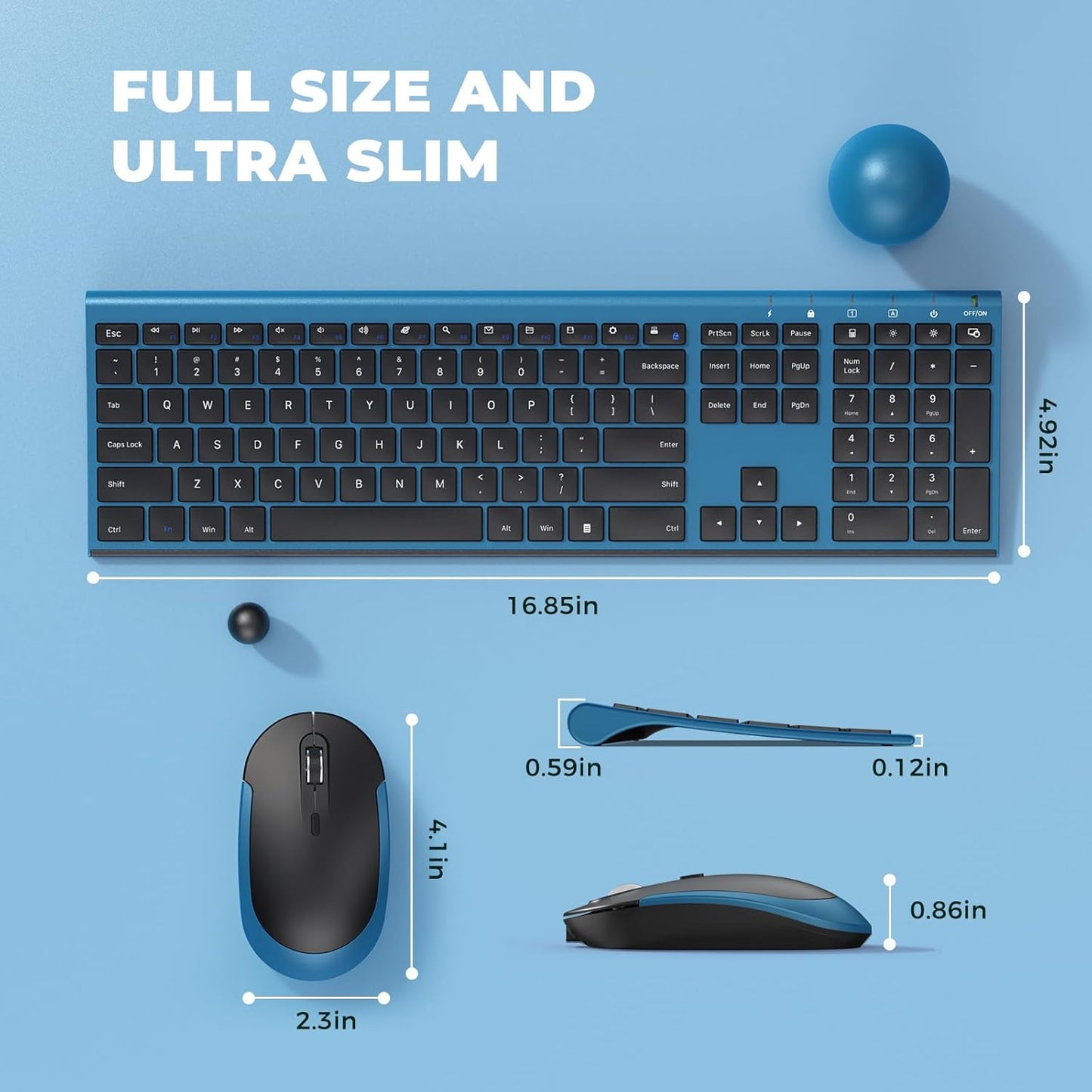
Wireless Keyboard and Mouse, Vssoplor 2.4GHz Rechargeable Quiet Full-Size Keyboard and Mouse Combo with Nano USB Receiver for Windows, Laptop, PC, Notebook-Black and Blue
Overview
- Brand : VssoPlor
- Color : Sapphire Blue
- Connectivity Technology : 2.4G Wireless
- Special Feature : Ergonomic, Full Size, Quiet, Rechargeable, Slim
- Compatible Devices : Laptop, Personal Computer
About this item
- ♥Stable Connection: 2.4 GHz wireless provides a powerful, reliable connecton up to 10m without any delays. 2 in 1 Nano receiver unifies the keyboard and mouse connections into one USB port, plug and play quickly. NOTE: The switch is on the top right corner of the keyboard
- ♥Adjustable DPI & Ergonomic Design: 3 DPI levels (1000/1600/2400 DPI) allows you to change the cursor sensitivity easily and track more smoothly over a variety of surfaces. Contoured shape fits your hands perfectly, reducing hand fatigue
- ♥Rechargeable & Auto Sleep Mode: This keyboard and mouse combo can be easily charged with included charging cable. Built-in rechargeable battery supports using for over one month with a single fully charge. It can automatically enter into sleep mode in order to save energy and press any key to wake it up
- ♥Full Size & Ultra Slim: Ultra slim (5.5mm) keyboard looks more stylish and elegant. High-End Scissor Switch design provides a better tactile response and comfortable and whisper quiet typing experience
- ♥Hot Keys & Compatibility: The full size keyboard includes fast-access hot keys, versatile function keys and number pad which can improve you work efficiency. Compatible with Computer, Laptop, Desktop, PC, Notebook, Windows XP / Vista / 7 / 8 / 10 or later
- ♥How to re-pair the keyboard and receiver? Turn on the keyboard switch, hold ESC+Q to enter Pairng Mode. You will see the indicator light flashing. Insert the usb receiver to your computer, place keyboard as close as you can and wait for a bit or until the light stop flashing. And there we paired the keyboard. Pair the mouse: Hold down the mid wheel and right click button and turn on the mouse switch simultaneously, wait for 2 seconds to enter pairing mode. Place mouse as close as you can to pair. Now release the button. Note: If this doesn't work, please turn off all wireless device around you and try the entire process again. Remember to pair the keyboard first, then the mouse.
- ♥Please Note: The USB receiver is located on the back of the mouse to prevent loss
Couldn't load pickup availability
30 in stock
View full details

Customer Reviews
-
Olivia S. ⭐⭐⭐⭐⭐
"VitaBalance has become a staple in my home. Their products help me stay on top of my health and give me peace of mind knowing I’m getting only the best."
-
Daniel T. ⭐⭐⭐⭐⭐
"Their omega-3 supplement is the best I’ve ever had. No aftertaste, and I feel much better after just a few weeks of use."
-
Emily K. ⭐⭐⭐⭐⭐
"Pure, natural, and effective! I love how transparent VitaBalance is with their ingredients. I trust this brand 100%."
Blog Posts
View all-
Top 10 Must-Have Electronic Devices in 2026 for...
Welcome to 2026! The tech landscape has evolved dramatically, and if you're looking to upgrade your workspace without breaking the bank, you're in the right place. This year brings a...
Top 10 Must-Have Electronic Devices in 2026 for...
Welcome to 2026! The tech landscape has evolved dramatically, and if you're looking to upgrade your workspace without breaking the bank, you're in the right place. This year brings a...
-
Sustainable Office Supplies: How to Go Green at...
Are you looking to make your office more eco-friendly? One way to do so is by incorporating sustainable office supplies into your workspace. By making simple changes to the...
Sustainable Office Supplies: How to Go Green at...
Are you looking to make your office more eco-friendly? One way to do so is by incorporating sustainable office supplies into your workspace. By making simple changes to the...
-
How to Create an Organized Workspace That Boost...
Creating an organized workspace is essential for boosting creativity and productivity. By implementing a few key strategies, you can transform your work environment into a hub of inspiration and...
How to Create an Organized Workspace That Boost...
Creating an organized workspace is essential for boosting creativity and productivity. By implementing a few key strategies, you can transform your work environment into a hub of inspiration and...